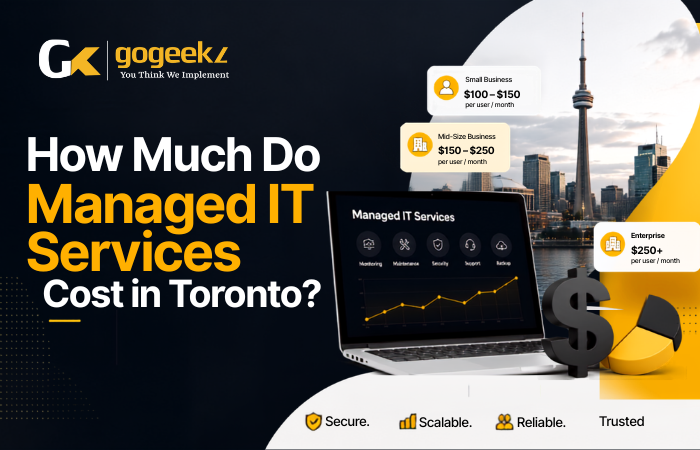

Toronto SMBs typically pay between $100 and $250 per user per month for managed IT services in 2026, depending on service scope, company size, and provider. That range sounds wide, and it is, because the gap between a basic help desk plan and a fully managed security-plus-infrastructure package is enormous. This guide breaks down exactly what drives that number, what’s reasonable to expect at each price point, and how businesses across Toronto, Mississauga, Brampton, Markham, and Burlington are structuring their IT budgets this year.
Why Managed IT Pricing Looks Confusing (And How to Read It)
Most pricing confusion comes from one source: managed IT providers don’t all sell the same thing. One company quotes you $99 per user and calls it “full management.” Another quotes $210 and lists half the services. The difference is almost always in what’s included versus what gets billed as an add-on.
The three most common pricing models you’ll see from providers in the Greater Toronto Area are per-user, per-device, and flat-rate. Per-user pricing is the most straightforward for office environments where each employee uses multiple devices, a laptop, a phone, maybe a tablet. Per-device pricing works better for manufacturing floors or retail locations where machines outnumber people. Flat-rate is popular with smaller businesses that want budget predictability above all else.
Per-user models in Toronto typically break down like this in 2026: basic monitoring and help desk runs $80 to $120 per user per month, mid-tier with security tools and backup runs $140 to $185, and fully managed with endpoint detection, Microsoft 365 management, compliance support, and vCISO-level guidance runs $200 to $260 or higher. These aren’t arbitrary tiers. They reflect the actual cost of tooling, labour, and liability an MSP takes on at each level.
Here’s something most vendors won’t volunteer: onboarding fees. Expect a one-time setup cost ranging from $500 to $3,000 depending on how many endpoints need to be configured, whether there’s a server migration involved, and how much documentation the previous IT setup left behind. Ask about this upfront. A low monthly quote with a $4,000 onboarding fee changes the math considerably in year one.
What You Actually Get at Each Price Point
The $80 to $120 per-user range covers the basics, and the basics matter. You’re getting remote monitoring and management (RMM) software like NinjaRMM or Atera running on your endpoints, patch management so your Windows machines stay updated automatically, and a help desk you can call when something breaks. Response times at this tier are typically next business day for non-critical issues, with four-hour or same-day response for outages.
What you’re not getting at that price is proactive security. There’s usually no endpoint detection and response (EDR) tool like SentinelOne or CrowdStrike Falcon. There’s no dark web monitoring, no security awareness training for staff, and no one reviewing your Microsoft 365 settings to catch misconfigurations. For a five-person bookkeeping firm with no sensitive client data, this might be acceptable. For a 30-person law firm in Markham or a financial services company in downtown Toronto, it isn’t.
The $140 to $185 range is where most Toronto SMBs with 10 to 75 employees land, and honestly, it’s the sweet spot for most professional services businesses. At this tier you should expect:
- Endpoint detection and response with 24/7 monitoring
- Managed Microsoft 365 or Google Workspace administration
- Cloud backup with tested restore procedures (tools like Acronis or Veeam)
- Multi-factor authentication deployment and management
- Quarterly business reviews with an account manager
- Help desk with four-hour response SLAs and defined escalation paths
The $200-plus tier is genuinely different, not just more expensive. Businesses in regulated industries, construction firms managing project data, healthcare clinics handling patient records under PHIPA, or any company that’s survived a ransomware scare will find the higher tier worth the cost. At this level you’re typically getting a virtual CIO or CISO who reviews your environment strategically, not just fixes tickets. Compliance mapping, vendor management, and incident response planning become part of the service. This is managed IT as a business function, not just a support subscription.
Hidden Costs Toronto SMBs Consistently Underestimate
The monthly retainer is only part of the real cost. Three expenses catch business owners off guard more than any others.
Software licensing is the big one. Many MSPs act as Microsoft CSP resellers, which means your Microsoft 365 Business Premium licenses (running around $26 CAD per user per month at current rates) may be billed through the MSP rather than directly from Microsoft. That’s not a markup trick, it’s a billing convenience, but if you don’t realize it, you’ll compare two quotes that look like apples and oranges when one includes licensing and the other doesn’t.
Project work sits outside your monthly agreement in almost every contract. A server migration, a new office setup in Brampton, a SharePoint build-out, or a VoIP system deployment will be scoped and billed separately, usually at hourly rates between $150 and $250 for senior engineers in the GTA. Ask your MSP for a project rate card before you sign anything. You need to know what “out of scope” actually costs before you commit.
Hardware procurement is handled differently by different providers. Some MSPs work on a hardware-as-a-service model where you pay a monthly fee per device and the MSP owns and refreshes the equipment. Others will quote, procure, and bill hardware at cost plus a markup, usually 10 to 20 percent. Neither model is wrong, but you should know which one you’re in and what your obligations are at contract end.
How Toronto’s Market Compares to the Rest of Canada
Managed IT services in Toronto and the broader GTA run about 8 to 15 percent higher than equivalent services in smaller Ontario cities like Hamilton or Kingston. This reflects labour costs. Senior network engineers and cybersecurity analysts in the GTA command significantly higher salaries than in smaller markets, and that cost flows through to MSP pricing.
Compared to Vancouver, pricing is roughly equivalent for mid-tier services, though some Vancouver providers compete harder on price for entry-level plans. Compared to Calgary, Toronto MSPs tend to run slightly higher at the security-focused tiers, partly because regulatory pressure from FINTRAC, PHIPA, and OSFI compliance requirements is more pronounced for GTA-based financial services and healthcare businesses.
One thing working in Toronto SMBs’ favour is density. There are more than 200 active MSPs operating in the Greater Toronto Area. That level of competition keeps pricing honest and gives buyers real negotiating room, especially on contract length. Three-year agreements used to be standard. Many providers in 2026 are now offering one-year initial terms with renewal options, which is a much better deal for a 20-person company that isn’t sure what its IT needs will look like in 36 months.
What a Real Managed IT Budget Looks Like for a 25-Person Toronto Business
Take a concrete example: a 25-person professional services firm with offices in Mississauga and a hybrid workforce, about 15 in-office and 10 remote. Their realistic managed IT budget in 2026 would look something like this.
At the mid-tier rate of $160 per user per month, the core managed services agreement runs $4,000 monthly, or $48,000 annually. Add Microsoft 365 Business Premium at $26 per user, which comes to $650 per month or $7,800 annually. A dedicated business internet connection with a failover LTE backup runs approximately $400 per month across both locations. Annual security awareness training through a platform like KnowBe4 adds roughly $1,500 for the year at that company size. A firewall refresh on a three-year hardware cycle averages out to about $800 per year.
Total annual IT spend: roughly $61,000, or about $2,440 per employee per year. That’s approximately 2.5 to 3.5 percent of revenue for a business doing $1.8 to $2.4 million annually, which sits right in the range most financial advisors recommend for professional services companies.
Compare that to the cost of a single full-time IT generalist in Toronto: base salary alone runs $65,000 to $85,000 plus benefits, payroll taxes, and the cost of the tools they’d need to do the job. And one person can’t provide 24/7 monitoring, deep security expertise, and strategic planning simultaneously. For companies under 75 employees, outsourced managed IT almost always delivers more capability per dollar than an internal hire.
What to Watch for When Comparing MSP Proposals in the GTA
Getting three quotes is smart. Reading them carefully is what actually matters. Four specific things separate a well-structured proposal from one that will cause you pain later.
First, look at the SLA response times and what “response” means. Some contracts guarantee a response within four hours, meaning someone acknowledges the ticket, not that the problem is resolved. Make sure your agreement specifies resolution targets for critical issues separately from acknowledgment targets.
Second, check whether cybersecurity is included or optional. In 2026, any MSP that treats EDR, email security, and MFA management as premium add-ons rather than baseline services is selling you an outdated model. Basic monitoring without security is genuinely not enough for most businesses operating in Ontario.
Third, read the exit terms. What happens to your data, your configurations, and your licenses if you leave? Some contracts make transitions unnecessarily painful. You want clarity on data portability and a reasonable off-boarding period, 60 to 90 days is standard.
Fourth, ask about staff turnover at the MSP itself. High-turnover shops mean whoever learned your environment last month may not be there next quarter. Ask how many clients each account manager supports. More than 30 clients per manager is a sign of a stretched team that won’t give your business much attention.
Frequently Asked Questions
Is managed IT worth it for a business with fewer than 10 employees?
Yes, and in some ways it matters more at that size. A nine-person firm doesn’t have IT staff, so any serious outage or security incident hits the entire business simultaneously. A basic managed services plan at $100 to $120 per user keeps you protected and supported without requiring a full-time hire. The ROI becomes very clear the first time something breaks on a Friday afternoon and it gets fixed remotely before Monday.
What’s the difference between break-fix IT support and managed services?
Break-fix means you call someone when something goes wrong and pay by the hour. Managed services means a provider is actively monitoring, patching, and managing your environment continuously. Break-fix is reactive and unpredictable in cost. Managed services is proactive and fixed in cost. For most Toronto SMBs doing more than $500,000 in revenue, the unpredictability of break-fix becomes a real business risk.
Can I negotiate managed IT pricing in Toronto?
Absolutely. Contract length, bundled services, and user count all create negotiating room. Committing to a two-year agreement instead of one often gets you a 5 to 10 percent discount. Bundling Microsoft licensing through the MSP sometimes reduces the effective per-user rate. And if you’re bringing more than 20 users, most providers have volume pricing they don’t advertise publicly.
How do I know if an MSP’s pricing is fair?
Get at least three proposals from providers who serve your industry. Compare scope line by line, not total price. A $180 per-user quote that includes EDR, backup, and compliance support may be a better deal than a $130 quote that bills each of those as add-ons. Also check whether the MSP has staff certified in technologies they’re proposing, CompTIA, Microsoft, and Cisco certifications are basic indicators of a legitimate shop.
If you’re a business in Toronto, Mississauga, Brampton, Markham, or Burlington trying to build an IT budget that actually reflects what you need in 2026, GoGeekz can walk you through a scoped assessment with transparent pricing, no onboarding surprises, and a proposal that shows exactly what’s included and what isn’t. Request a no-obligation IT assessment from GoGeekz and get a real number for your specific environment — not a generic estimate pulled from a pricing sheet.
Call us at (647) 875-4335 or email [email protected] to book your free IT budget review today.